What Is a DNS Leak and How Do You Test for One?
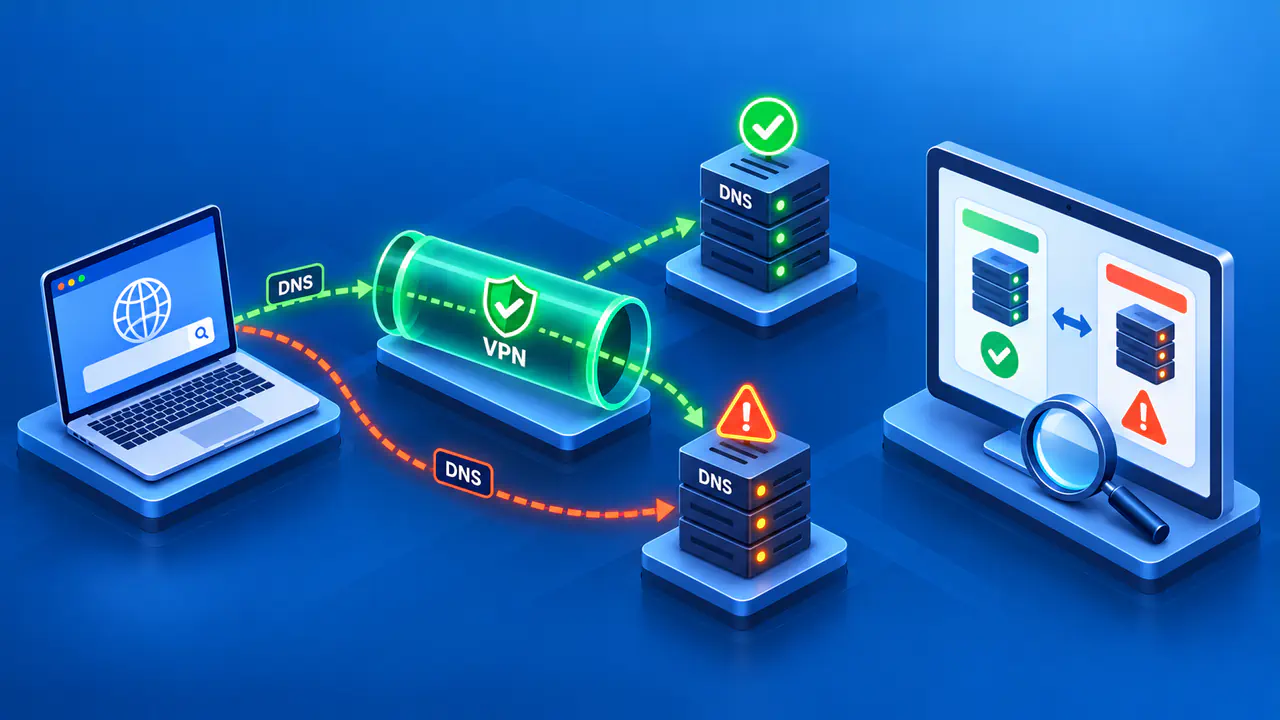
A DNS leak occurs when a DNS query bypasses the VPN or other connection that was supposed to carry it. DNS helps applications find addresses for domain names. To check for a leak, compare the DNS servers reported by a test with the servers and connection your setup is meant to use. A provider name on a results page is a clue, but it cannot establish the query's full route.
Your browser, operating system, VPN, and proxy can each affect where a lookup goes. A browser may use a separate encrypted DNS service while its connection to that service still passes through the VPN. An unexpected DNS provider therefore does not automatically mean the query escaped the tunnel. You need to check both who receives the query and how your device reaches that server.
What DNS Can Reveal
A DNS query can reveal the domain name an application is trying to resolve. The resolver handling the request can see that name, even when the connection to the resolver is encrypted. Depending on the service's practices, the operator may retain query information. Unencrypted DNS can also expose the query to observers along the network path.
DNS over HTTPS, or DoH, sends DNS queries and answers over an HTTPS connection. DNS over TLS, or DoT, protects DNS exchanges with TLS. Both can protect queries between your device and the resolver, but neither routes all application traffic through a VPN. An encrypted connection also does not remove the need to trust the resolver receiving the queries.
A domain lookup normally contains a name, rather than the path, query parameters, or contents of a web page. Unexpected DNS routing can nevertheless disclose names you intended to keep away from a particular network or DNS operator.
What a DNS Leak Test Shows
A browser-based DNS test asks your browser to resolve names under a domain used for testing. The test operator can observe which DNS servers contact that domain's authoritative servers, which hold its DNS records. The results identify servers involved in resolving those test names, rather than drawing a complete map of the route from your device.
The server listed in your device's settings may forward queries to another resolver. A test can then report that upstream service instead of the first server your device contacted. For example, a VPN provider may use an infrastructure partner whose name differs from the VPN brand. Check the expected DNS service before deciding that an unfamiliar organization represents a leak.
Check Your Settings before Testing
Record the operating system, VPN app version, selected server, and browser you will use. Note the system DNS settings, browser secure DNS settings, any proxy, and any split-tunneling exclusions. Split tunneling lets selected traffic bypass the VPN, so check whether the browser itself is included in the tunnel.
Decide what you expect the tested application to do. You may want system DNS to use the VPN provider's resolver through the tunnel, or you may have deliberately selected another encrypted DNS service. On a managed work device, follow the organization's required configuration. Do not turn off encrypted DNS merely to make a test display a preferred company name.
A proxy can change where name resolution happens. Depending on the protocol and client settings, the application may resolve a name locally or send the name to the proxy for resolution. Check the configuration of the actual application being tested. A browser's proxy settings do not establish how an unrelated app resolves names.
Compare Results with and without the VPN
Choose a time when disconnecting the VPN will not interrupt important work or expose sensitive activity from other apps. If your device's policies allow it, disconnect the VPN and run a DNS leak test from a service you trust. Record the reported DNS addresses and organizations privately. Keep the same browser and underlying network for the next comparison.
Connect the VPN and wait for its app to report an established connection. Start a new test and let it finish, then record the DNS servers shown. Compare those results with the VPN provider's documented DNS behavior and your browser and system settings. A test that fails to finish does not establish that DNS stayed inside the tunnel.
If you intentionally use a separate DoH service, confirm that the browser is configured for that service and is supposed to reach it through the VPN. If you expect the VPN provider to manage DNS, investigate a result that still identifies your ordinary internet provider. Keep IP addresses, query logs, account information, and test identifiers out of public troubleshooting posts.
Investigate Unexpected DNS Servers
Start with settings that could explain the difference: browser secure DNS, a manually selected system resolver, app exclusions, and proxy name resolution. A VPN app may allow custom DNS or impose different restrictions across platforms. Use the instructions for your current app and operating system, because a setting that is supported in one client may behave differently in another.
If a VPN connection drops, DNS queries may return to the system's usual resolver unless the client blocks or reroutes them. Review the VPN app's DNS protection and its behavior after a connection failure. A result obtained while the tunnel was working does not verify what happens when the tunnel is unavailable.
A country or city beside a DNS address usually comes from IP geolocation data. The database can be inaccurate, and even an accurate location does not show how the query left your device. If the DNS service should be reached only through the VPN, use the VPN provider's supported diagnostics or ask the administrator to verify that connection.
If you are authorized to change the settings, change one relevant setting at a time and repeat the same test. Record what changed and whether the result changed with it. Keep any diagnostic logs private; a packet capture can contain queried domains and other sensitive traffic. Restore settings changed only for testing and confirm the intended DNS configuration afterward.
Check DNS routing separately from the public IP used for web requests. A browser can send DNS to an unexpected resolver while its web traffic still uses the VPN, or send web traffic directly while DNS follows the expected route. Give the provider or administrator the tested application, relevant settings, expected DNS service, and observed result. That information helps narrow the cause without presenting one browser test as proof about every app on the device.