What Is DNS and How Does It Work?
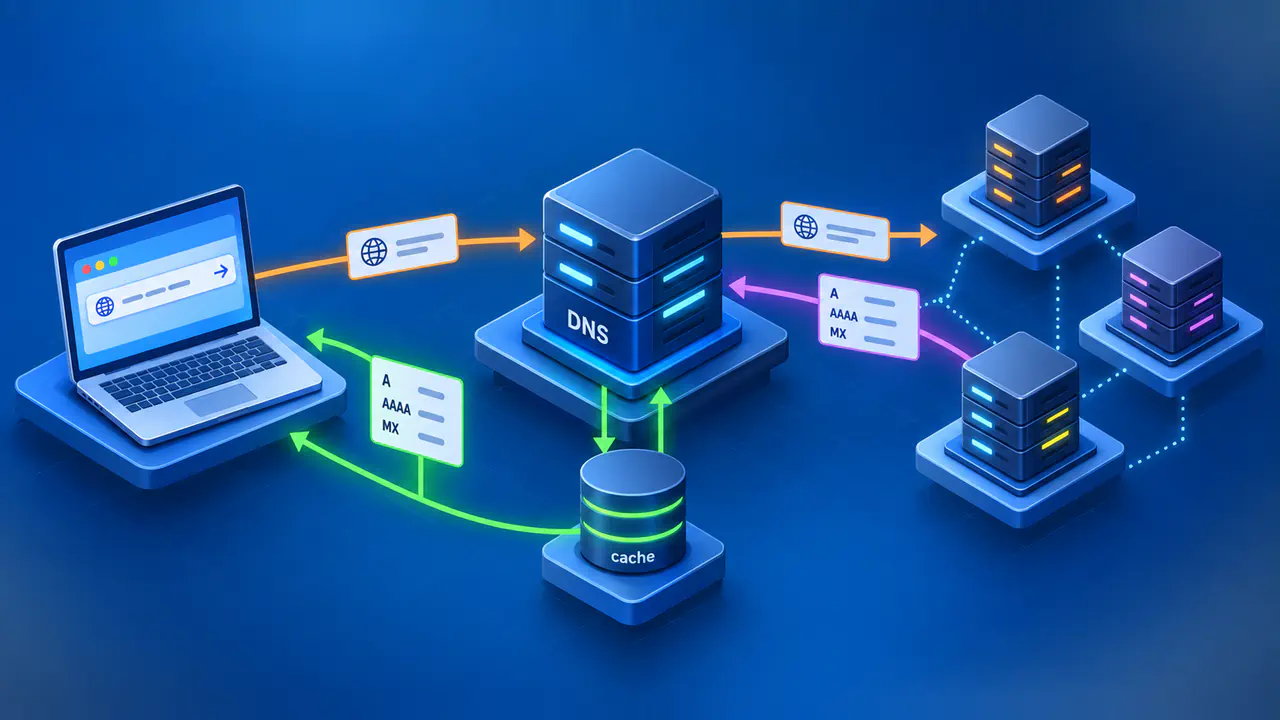
The Domain Name System, or DNS, is a distributed system for finding records associated with domain names. An application asks a resolver for the data it needs, such as an IP address for a website. The resolver can answer from its cache or obtain the information from servers responsible for that part of the DNS.
Suppose a browser needs an address for www.example.com. It can use an address it already has or request a DNS lookup through the device's operating system or its own DNS client. When a lookup is needed, the question identifies the name and the type of record to retrieve.
The Three Roles in a DNS Lookup
A stub resolver is the DNS client that relies on another resolver to complete lookups. It commonly runs on the device that needs the answer. The application requests information through this client, which sends a DNS question and passes the result back.
A recursive resolver does the work of obtaining an answer for its client. It can consult its cache, query other servers, follow referrals, and return a completed answer or an error. A resolver configured to forward queries can instead ask another recursive service to perform the lookup.
An authoritative nameserver serves records for one or more zones, which are portions of the DNS namespace managed as separate units. A zone includes its own name and names below it, except where authority has been delegated to a separate child zone. For names within its authority, the server answers from the zone data it serves.
One server can perform both recursive and authoritative roles, depending on its configuration and the question. An answer from its recursive cache has a different origin from an answer based on a zone it hosts. The server's role in that particular exchange matters when interpreting a result.
Following a Name through the DNS Hierarchy
For a public name, a resolver that performs the lookup itself uses referrals to find the appropriate authoritative server. Each referral identifies nameservers responsible for a more specific portion of the namespace. Consider an address lookup for www.example.com when the resolver has no relevant cached answer or delegation:
- The device's DNS client sends the question to its recursive resolver. For an IPv4 address, the requested record type is A.
- The recursive resolver uses its information about root servers to contact one. A root server can refer it to nameservers for the com zone.
- A com nameserver can return the delegation for example.com. That delegation identifies the nameservers serving the example.com zone.
- The resolver queries an authoritative server for example.com. If that zone contains an A record for www.example.com, the server can return the address data.
- The recursive resolver returns the result to its client and can cache the records it learned. The browser can then use a returned address to attempt a connection.
The recursive resolver sends separate queries as it follows these referrals. Root and parent servers point it toward other nameservers rather than forwarding the browser's request along a chain. A referral can include address records that help the resolver contact the next server; otherwise, additional lookups may be needed to find those addresses.
Not every lookup follows all five steps. A cached delegation can let the resolver begin closer to the destination zone, and a usable cached answer can eliminate the need to contact that zone's servers. If authority for a name has been delegated further down the tree, the resolver follows that additional delegation.
Record Types and Aliases Affect the Answer
An A query requests IPv4 address records, while an AAAA query requests IPv6 address records. An MX query asks for the mail servers designated to receive a domain's email. DNS therefore carries several kinds of information, and a successful answer for one record type does not guarantee that another type exists at the same name.
A CNAME record makes one name an alias for another, called the canonical name. If www.example.com is an alias, an address lookup can return that CNAME together with address records for its target. When the target's address is not already available, the resolver continues the lookup for that target, which may belong to a different zone.
Why Caches Can Return Older Records
A DNS cache can return older records because it retains data learned before an authoritative change. A record's TTL specifies how many seconds it may normally be reused before its source must be consulted again. The remaining lifetime decreases as the record sits in the cache.
Suppose a resolver caches an address with a TTL of 300 seconds, and the address in the authoritative record changes 100 seconds later. Without an earlier refresh or cache removal, the old answer can remain usable for another 200 seconds. A different resolver with no cached copy may obtain the new address immediately, even though both resolvers are functioning correctly.
Negative responses can be cached too. If a resolver recently learned that a name did not exist, it may continue returning that result after the name is created. The normal lifetime of that cached negative response comes from the SOA record, which supplies zone information in the negative response, rather than the TTL of the newly created address record.
TTL does not schedule when a DNS provider publishes an edit or make every cache refresh simultaneously. Some resolvers can also serve expired data temporarily when they cannot refresh it, using a feature called serve stale. When comparing answers after a change, check the same name and record type, the authoritative data, and the caches involved.
Separate DNS Results from Connection Failures
A negative DNS answer reports that the requested name or data is absent. A timeout means no usable response arrived in time, while SERVFAIL indicates that a DNS server could not complete the query. These outcomes call for different checks: a negative answer concerns the data visible to that query, while a timeout or failure can require investigation of the servers and the path between them.
A returned address is not proof that the application at that address works. The client still needs network connectivity and a functioning service, and an HTTPS connection also depends on successful security checks. A stopped web server, a firewall rule, or a certificate problem can prevent a page from opening even when DNS supplies the intended address.