ARP Cache Problems and Local Connectivity
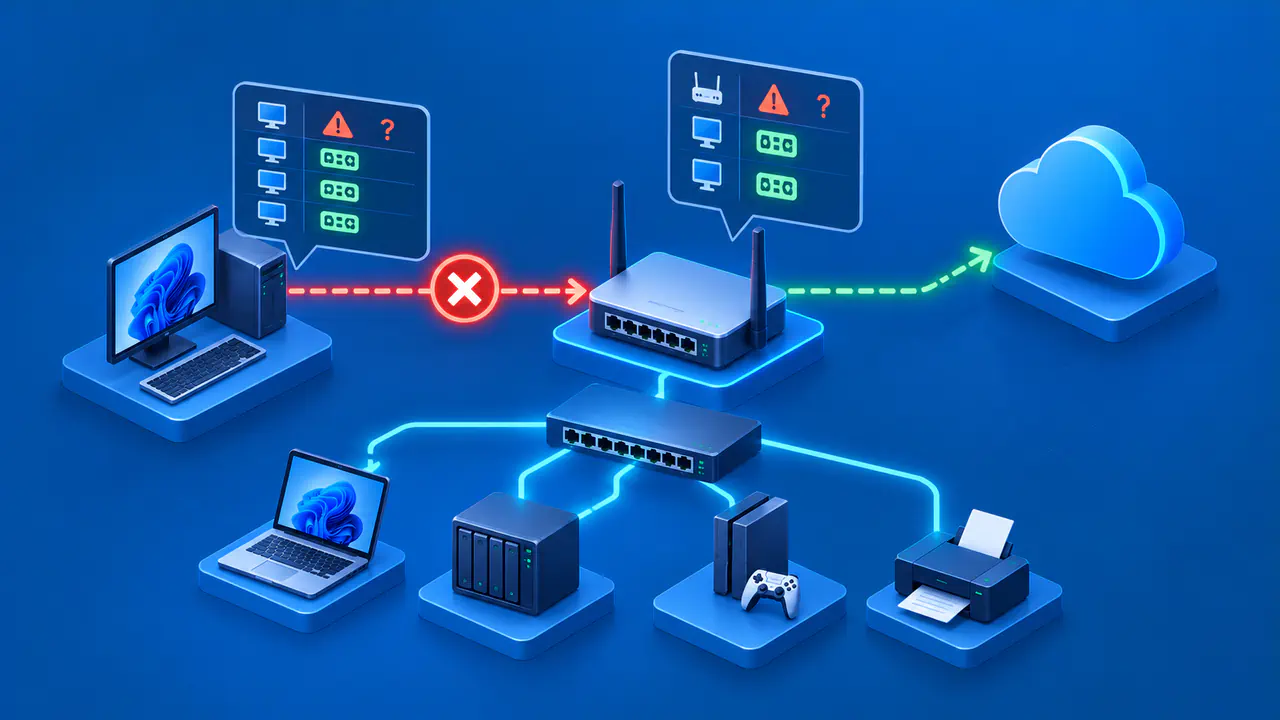
An ARP cache problem can prevent a device from reaching an IPv4 neighbor on its local network. On Ethernet and Wi-Fi, the cache associates IPv4 addresses with the MAC addresses used to deliver packets to nearby devices. A neighbor may be another device on the same link or a router forwarding traffic to the internet. The cache is not a complete list of devices on the LAN, and it does not reveal the MAC addresses of remote internet hosts.
Before deleting anything, identify the address actually being resolved, inspect its entry and state, and compare the result with information from the device or network administrator. A Linux entry marked STALE is not automatically broken; it commonly means reachability needs to be checked again when the entry is used.
Identify the IPv4 Neighbor to Check
ARP resolves IPv4 addresses for neighbors on a local link. IPv6 uses Neighbor Discovery, which has related neighbor states but different protocol messages and troubleshooting details. If the destination is outside your local network, your computer normally resolves the MAC address of its next-hop router rather than the remote website or server. Deleting an ARP entry cannot fix a DNS server error, a closed application port, or a fault on a remote network. A local mapping problem can prevent access to those destinations, but clearing the cache only helps if that mapping is the cause.
On Linux, ip route get 198.51.100.20 shows the route the kernel would use to reach a destination. The address here is an example; use the destination involved in your authorized test. Look for the interface Linux will send through and a gateway address after via, if one is listed. If a gateway appears, that gateway's local IPv4 address is usually the neighbor to inspect. A directly connected destination can itself be the neighbor.
Also confirm that the interface is connected and that the local IPv4 address and subnet are correct. If the route points to the wrong interface or gateway, fix that configuration first. Clearing ARP cannot repair a wrong route or disconnected cable.
Inspect the Neighbor Entry and Its State
On Linux, the iproute2 utilities include commands for viewing and managing the IPv4 ARP table. Run ip -4 neigh show for a read-only view, or narrow it with ip -4 neigh show dev eth0 after replacing eth0 with the actual interface. Find the relevant neighbor address and its state. On Ethernet or Wi-Fi, the value after lladdr is the neighbor's MAC address; it may be absent if address resolution has not completed. Do not mistake an absent entry for proof that a device is missing from the LAN; entries are created and refreshed as traffic needs them.
REACHABLE indicates recently confirmed reachability. STALE means the mapping has not been confirmed recently and may be probed again. DELAY means Linux is waiting before probing the neighbor, while PROBE means probes are being sent. INCOMPLETE indicates that resolution has not yet completed, while FAILED means the allowed probes ended without success. These states describe local neighbor resolution, not the health of every application on that device.
Capture the address, interface, link-layer address, and state before changing anything. On a managed network, a permanent or externally managed mapping may be intentional. Do not remove such entries merely because they look unfamiliar.
Compare the Cached and Actual MAC Addresses
If you suspect an incorrect mapping, get the current IPv4 and MAC addresses from the device's network settings, a trusted switch or router management page, or the network administrator. Confirm you are comparing the same interface and VLAN. Wi-Fi and Ethernet interfaces can have different MAC addresses. Devices with network adapters configured for failover may also share a MAC address across those adapters, so the current address can differ from the one printed on an adapter.
If the cached MAC differs from a trusted current record for the same local IP, investigate whether the IP was recently reassigned, whether another device is using the address, or whether a router is expected to answer ARP requests on behalf of another device, a feature called proxy ARP. Repeated changes between two MAC addresses can point to an address conflict or network design issue; removing the entry may briefly mask it without resolving the cause.
For a FAILED or persistently INCOMPLETE entry, check the cable or Wi-Fi connection, VLAN, local subnet, and whether the target is powered on and connected to the expected network. Pinging the neighbor's IPv4 address may help, but a timeout alone does not show whether ARP resolution or another part of the connection failed. Read the neighbor state again after a normal connection attempt to see whether resolution changes.
Delete Only a Confirmed Bad Entry
If evidence points to one incorrect dynamic entry and the underlying address and network configuration are now correct, a targeted deletion can make Linux resolve that neighbor again. Use sudo ip neigh del 192.0.2.1 dev eth0 with the exact neighbor IP and interface from your inspection. The example address and interface are placeholders; substitute the confirmed local values. Deleting an entry requires appropriate administrative privileges.
Avoid clearing the entire ARP cache to fix a single suspected mapping. Clearing the cache removes unrelated neighbor entries and can briefly disrupt other connections. Also avoid manually changing kernel-created special entries such as NOARP, because deleting or modifying them can produce unpredictable behavior. If the entry is static, managed by network software, or repeatedly reappears with a wrong address, correct the source of that configuration instead of repeatedly deleting it.
Deletion is a diagnostic or recovery step, not proof of a fix. Traffic to the neighbor triggers resolution again. If the same wrong result returns, investigate duplicate IPs, switch or VLAN configuration, proxy ARP, or the device's own addressing.
Verify the ARP Entry and the Affected Service
After the targeted deletion, retry the operation that failed and inspect the same neighbor entry again. Compare its new link-layer address with the trusted device record and check whether address resolution has completed. Then test the actual service that was affected, because a correct ARP mapping only establishes one part of the path.
If the neighbor mapping is correct but the application still fails, continue with routing, firewall, DNS, and service checks as appropriate. If the entry remains unresolved, focus on local connectivity and the target's presence on the expected link. Keep the results from before and after the change; comparing them can help distinguish a temporary cache problem from a network fault that still needs attention.