Layer 2 vs Layer 3 Switches Explained
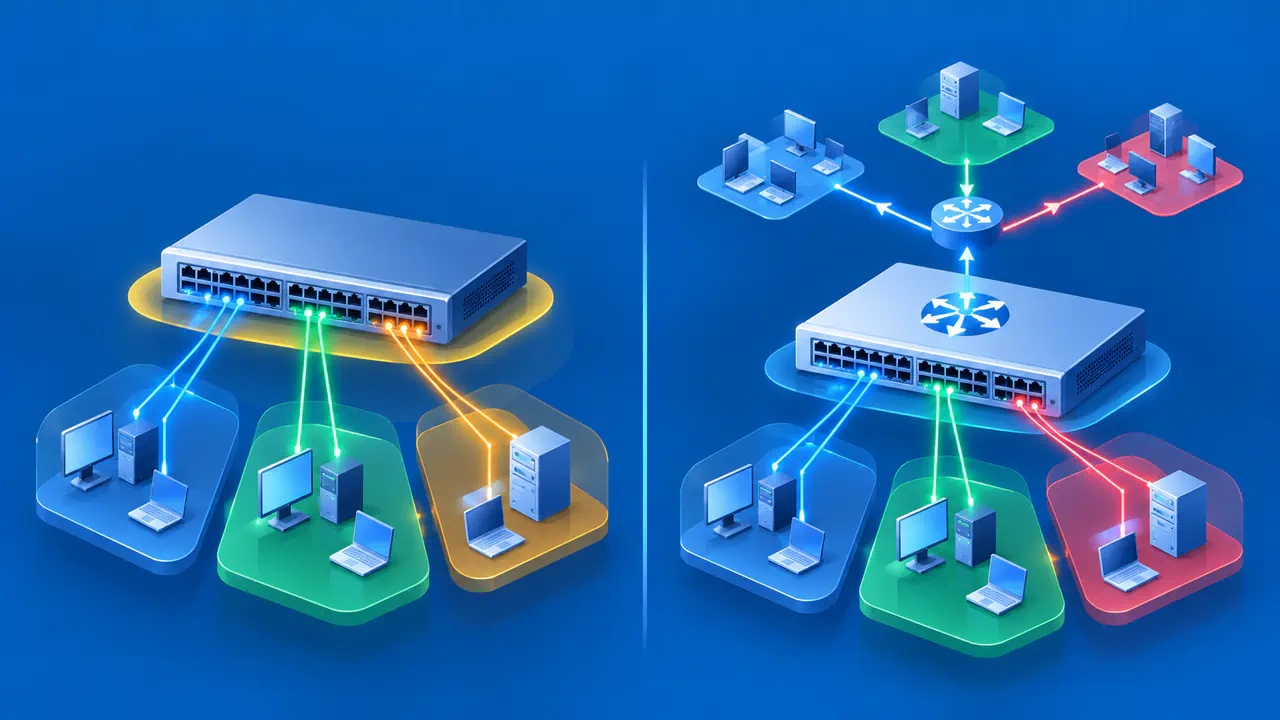
A Layer 2 switch forwards Ethernet frames within a network using destination Media Access Control (MAC) addresses. A Layer 3 switch can also route Internet Protocol (IP) packets between networks using destination IP prefixes. These layers refer to the data-link and network layers of the Open Systems Interconnection (OSI) model. These labels describe how a switch can forward traffic; they do not rank switches by speed.
A Layer 3 switch still performs Layer 2 switching on ports configured for that purpose. Traffic between two hosts in the same virtual local area network (VLAN) can remain switched, while traffic to another subnet passes through a routing interface. Both behaviors can occur in the same physical device.
A network design must identify which hosts share each VLAN and where their gateways are located. Traffic between subnets needs a device with suitable routes and access rules; creating VLANs alone does not provide that routing.
How Layer 2 Forwarding Uses MAC Addresses
An ordinary learning switch records the source MAC address of a received frame along with its incoming port and VLAN context. This creates a forwarding entry indicating where that address was seen. The switch then uses the destination MAC address to decide where to send the frame.
When a usable destination entry identifies another port, the switch can send the frame toward that port. If the destination belongs behind the incoming port, the switch normally filters the frame rather than sending it back there. Port state, VLAN membership, and configured restrictions still affect whether forwarding is allowed.
An unknown unicast destination generally causes flooding through eligible ports in the same VLAN, excluding the incoming port. Flooding settings can change that behavior. Unknown does not mean the address is invalid or that the endpoint is absent; it means the switch lacks the forwarding entry needed for a specific outgoing path.
The MAC table is different from an Address Resolution Protocol (ARP) table. The MAC table associates an Ethernet address with a switching path. ARP associates an IPv4 address with a link-layer address, allowing a sender to construct an Ethernet frame for a local next hop.
Follow Traffic within One VLAN
Consider a hypothetical network with host A at 10.20.10.25/24 and host B at 10.20.10.80/24, both connected to VLAN 10. With ordinary subnet routing and no more specific host route, A treats B as directly reachable on its local network. It sends traffic toward B's MAC address rather than its default gateway's MAC address.
If A needs address resolution, its ARP request reaches the eligible ports in VLAN 10. B's reply provides B's MAC address for the Ethernet frame. The switch learns from received source addresses and can subsequently forward known unicast traffic toward B's port.
A gateway is not required for this ordinary local exchange. The same remains true when the VLAN extends through multiple switches, provided the Layer 2 path carries that VLAN correctly. Crossing another Layer 2 switch does not add an IP routing hop.
Layer 2 forwarding leaves the packet's IPv4 TTL unchanged. Other switch features may inspect IP information for filtering or classification, but that inspection does not mean the packet has been routed. The forwarding action and the configured interface role establish the distinction.
VLANs Define Separate Broadcast Domains
A VLAN establishes a logical Layer 2 broadcast domain. A broadcast received in VLAN 10 is not ordinarily bridged into VLAN 20. A trunk can carry several VLANs over one physical link while preserving their separate switching contexts.
Hosts in the same VLAN may be attached to different switches, and hosts attached to one switch may belong to different VLANs. Two hosts share a Layer 2 network only if their VLAN membership and the links between them allow it.
A VLAN ID and an IP subnet are different identifiers. Assigning VLAN number 20 does not create an IP subnet whose address contains 20. A common design associates one subnet with each VLAN, but the administrator must configure the addressing and gateway separately.
Putting addresses from the same subnet into isolated VLANs does not automatically make those hosts reachable. Each host may try to find the other locally, while the separate broadcast domains prevent the ordinary address-resolution exchange. Correct the network design rather than assuming the Layer 3 switch label will resolve that mismatch.
Follow a Packet across Two Subnets
Extend the example with host C at 10.20.20.40/24 in VLAN 20. Give VLAN 10 a gateway at 10.20.10.1 and VLAN 20 a gateway at 10.20.20.1 on a device configured to route between them. Assume the necessary interfaces are operational and the forwarding policy permits the exchange.
The Sender Reaches Its Gateway
Host A recognizes that 10.20.20.40 is outside its local /24 network and selects its configured gateway for this destination. A resolves 10.20.10.1 to the gateway's MAC address if necessary. Its outgoing frame is addressed to that gateway.
Inside the frame, the IP packet still has A's source address and C's destination address. The gateway address identifies the local next hop, not the final IP recipient. The intervening Layer 2 switches forward the frame toward the gateway using its destination MAC address.
The Gateway Selects the Next Network
The gateway examines the destination IP address and selects a matching route. In ordinary destination routing, a more specific matching prefix takes precedence over a less specific matching prefix in the forwarding table. A connected route for 10.20.20.0/24 directs this example toward VLAN 20.
The routing device reduces the IPv4 TTL and updates the IPv4 header checksum accordingly. For an Ethernet destination on the outgoing network, it sends a new frame with its outgoing interface's source MAC address and C's destination MAC address. The original frame's source and destination MAC addresses do not follow the packet across the routing boundary.
In this example, which performs no address translation, the IP source and destination remain 10.20.10.25 and 10.20.20.40. Host C needs its own suitable return route, typically through 10.20.20.1, for the reply to reach A. A working forward route alone does not establish two-way communication.
Place the Gateway Where Routing Is Intended
On a Layer 3 switch, an SVI, or switch virtual interface, can provide the routing interface associated with a VLAN. The SVI has an IP address that hosts can use as their gateway. Several Layer 2 switch ports can belong to the VLAN represented by that one logical interface.
A routed physical port has a different role: it acts as a Layer 3 interface rather than an ordinary VLAN switch port. It is useful for a routed connection to another network device. The presence of routed ports does not require every access port on the switch to stop switching.
Alternatively, a Layer 2 switch can carry VLAN traffic to an external router or firewall that provides the gateways. Moving a gateway onto a switch changes where inter-subnet forwarding occurs. If the external firewall previously filtered traffic between those subnets, configure the new routing path to preserve the required restrictions.
Routing Capability Requires Configuration
A routing-capable switch needs the relevant Layer 3 interfaces, addresses, routes, and forwarding settings. The associated VLANs and Layer 2 paths must also work. For example, on Catalyst 9200 switches running IOS XE 17.15.x, IP routing is disabled by default and must be enabled for IPv4 routing; that product-specific default should not be assumed for every switch.
An IP address used to administer a Layer 2 switch does not prove that the switch routes traffic between clients. That address may provide access to the switch's own management services. Distinguish packets addressed to the device itself from packets it forwards on behalf of other hosts.
Check what the actual model and software support for the intended design. Relevant details include IPv4 and IPv6 routing, supported route types, interface roles, access controls, and forwarding-table resources. A Layer 3 label does not promise every router or firewall feature. Routing and access rules together determine which VLANs can communicate.
Troubleshoot Local and Routed Traffic
For a local destination, examine the host's addressing, VLAN membership, MAC forwarding entries, and active Layer 2 path. For a remote subnet, also examine the selected gateway, routing interface, destination route, next-hop resolution, and return route.
Separate a missing route from a denied packet or an unreachable next hop. A route can exist while an access control list (ACL) blocks the exchange. Even when the packet is permitted, the device needs the next hop's link-layer address to send an Ethernet frame. Keep observations from the relevant interfaces and tables distinct so a single failed ping is not treated as proof that the switch lacks routing capability.