What Happens When a Domain Expires?
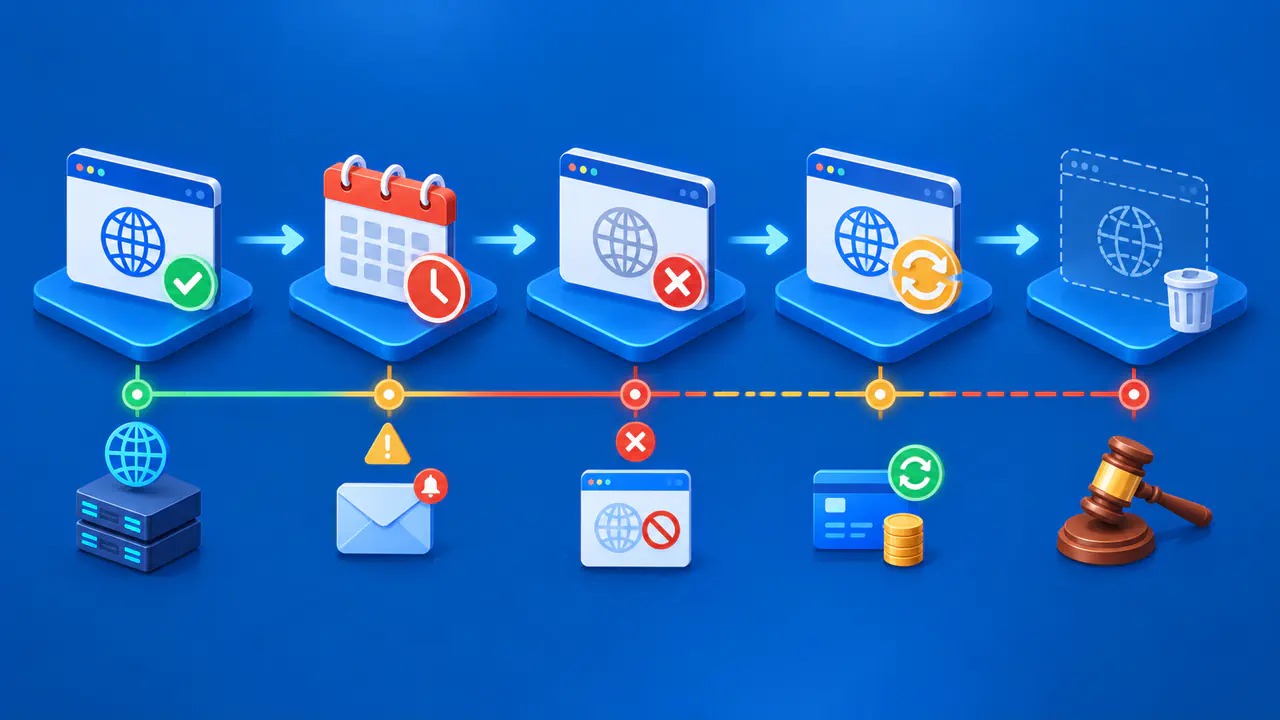
A domain's expiration date ends its paid registration term unless it has been renewed. It does not necessarily mean the name is deleted from the registry or available to someone else that day. The registrar may interrupt the domain's DNS path, keep it renewable for a period, or later request deletion. What happens next depends on the extension, registry, registrar agreement, and current status.
If the domain supports a website or email, act before expiration. Once its DNS path stops working, pages and mail delivery can fail even while the registration is still potentially recoverable. The recovery requirements described here apply to generic top-level domains, or gTLDs, such as .com and .net. Country-code extensions follow their own registry rules and may use different recovery stages.
Prepare before the Expiration Date
Check the expiration date in the account that manages the registration, the renewal setting, and the payment method. Record the accredited registrar if the domain was bought through a reseller. Keep a reachable registration email that does not depend solely on the expiring domain. If the only mailbox for notices uses that domain, an interruption could also block access to the very messages needed to resolve it.
Review the provider's published renewal, post-expiration renewal, and restoration charges. For gTLD registrations, renewal and restoration fees must be available when you register, including on reseller websites. A promotional purchase price does not define what recovery will cost later. Set independent calendar reminders before expiration, and verify that a renewal has actually completed rather than assuming an automatic-payment setting is enough.
Understand the Renewal Notices
For gTLD registrations, registrars must send at least two notices before expiration: approximately one month and one week in advance. If the registration is neither renewed nor deleted, another notice with renewal instructions is required within five days after expiration. These notices are a safety measure, not a substitute for monitoring your own account.
Notices can be missed because a contact address is outdated, a mailbox is unavailable, or a message is filtered. A renewal email can also be fraudulent. Open the registrar's known site directly, sign in, and check the domain's status before paying through a link in a message. If the account shows an unexpected expiration or payment problem, contact the registrar or its reseller through verified support details.
Separate Expiration from Deletion
Expiration is the end of the registration term. Deletion is a later action in which the registrar asks the registry to remove the registration. Those events need not occur on the same date. A registrar may delete an expired gTLD registration under the applicable rules, so there is no single renewal window after expiration that applies to every domain.
For a gTLD registration deleted within eight days of expiration, the registrar must interrupt the existing DNS path from expiration until deletion, if the registry allows that interruption. If deletion occurs eight or more days after expiration, the registrar must interrupt DNS for at least the final eight consecutive days during which the former registrant can renew, again where the registry permits it. Renewal must remain available from expiration through the applicable interruption period.
If the registrar redirects web traffic to a page while the expired registration is still renewable, the page must identify the expiration and give renewal instructions. The website or email may therefore fail before the registration is deleted. A parked page does not prove that someone else has registered the name.
Some registrars may auction an expired domain under the registration agreement before the name is deleted from the registry. That is a different process from releasing an unregistered name for anyone to register. Check the agreement's renewal cutoff and auction terms; an auction listing alone does not tell you whether your renewal option has already ended.
Likewise, the displayed expiration date is not a reliable prediction of a public drop date. Registrars and registries can apply different processing steps, and a name may be renewed or restored before release. If you need to keep a domain, work through the existing registrar now instead of waiting to see whether it becomes available again.
Read Redemption and Status Information Carefully
Most generic top-level domain registries must provide a 30-day Redemption Grace Period immediately after deletion. Sponsored gTLD registries are exempt from that requirement, and names deleted during the registry's initial add-grace period just after registration are excluded.
During the redemption period for a covered registration, the registrar that deleted the name must allow the former registrant to request restoration. A restoration fee may apply. This period begins after deletion, not on the expiration date. Country-code domains may use a different recovery process or offer no equivalent stage.
Registration status codes can help locate the domain in the process. The redemptionPeriod status means the registrar requested deletion and the registration is in its redemption stage. pendingRestore means the registrar has requested a restoration that is still being processed. pendingDelete without redemptionPeriod or pendingRestore can indicate that the redemption stage ended and the name is approaching removal. Read the full set of current statuses with the registrar, because one code in isolation does not explain every cause.
A clientHold or serverHold status can keep a domain from resolving in DNS, but such a hold is not proof by itself that the registration expired. Holds can arise for different reasons. Ask the registrar to identify the cause and what action is available. If a restoration succeeds, normal DNS operation may still take time to return; check the registration and actual service separately.
Contact the Registrar Promptly
If the domain has expired, use the registrar account or verified support channel immediately. Provide the exact domain and ask whether it is still renewable, has been deleted, or is in a restoration stage. Ask for the current fee, required identity checks, and the next deadline under that extension's rules. Save written instructions and receipts. If a reseller handles the account, ask it to identify the accredited registrar responsible for the registration action.
After a renewal or restoration, confirm the updated expiration date and registration status in the account. Then check that the intended name servers and DNS service work and that the website and mail systems respond as expected. A payment receipt alone does not prove every service has recovered.