Why Does Your Domain Open Someone Else's Website?

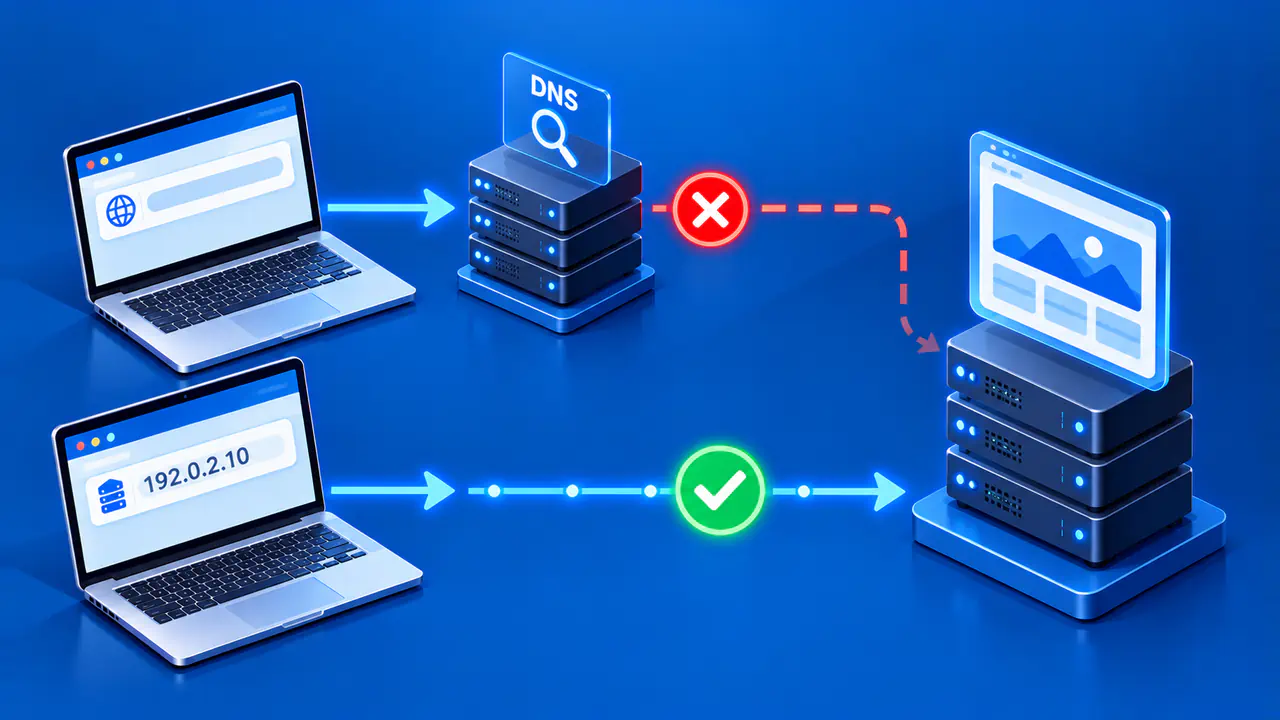
If your domain opens a different website, first determine whether the browser reached the wrong server or the intended server selected the wrong site. DNS records and proxy settings determine which server receives the request. A web server then uses the requested hostname, along with the address and port, to choose a site configuration. Opening a bare IP address does not test how the server handles requests for your domain.
Record the exact URL, the page you saw, the time, and whether the problem appears on both the root domain and its www name. Do not assume the domain was compromised based on one screenshot. Work from the public hostname through DNS, any CDN, and finally the hosting account or virtual-host mapping. Change only a domain or server you administer, after preserving the current settings.
Test the Exact Hostname
Open the intended website URL using HTTPS and note the final address after any redirects. A page may look unrelated because the domain redirects elsewhere; the address bar reveals whether navigation moved to a different hostname. Test the root name and www separately because they can have different DNS records and server mappings. Check both HTTP and HTTPS behavior only where it is safe to do so for your own site.
Ask whether the wrong page appears for everyone or only from one network. A resolver may still hold an older DNS answer, while a local override can direct one computer to a different server until that override is removed. An authenticated admin session or browser cache can also change what you see. Compare a clean browser session and an independent network, while keeping the hostname constant. Preserve the resulting URL, response status, and DNS answer rather than relying on visual appearance alone.
Inspect DNS and Proxy Status
Identify the authoritative DNS provider and inspect the A, AAAA, and CNAME records for the exact affected hostname. Compare their targets with the destination intended by your hosting provider. A record pointed to an old server, a mistyped address, or a CNAME to an unrelated service can take visitors to the wrong infrastructure. Also check whether the registrar has a URL forwarding service enabled. Such a service uses DNS to send visitors to a forwarding server, which then redirects the browser; the DNS record itself does not issue an HTTP redirect.
If the name is behind a CDN, a public DNS lookup may return proxy addresses rather than the origin address. With a proxied Cloudflare record, visitors receive Cloudflare addresses; a DNS-only A or AAAA record returns its configured address. Check the destination set in the CDN account as well as any rules that change the origin or redirect requests. Do not conclude that a Cloudflare IP is the wrong hosting server merely because it differs from the account IP.
DNS results alone cannot prove which site an HTTP server will choose. Multiple names can legitimately resolve to one address. The next step is to inspect the server configuration for the hostname that the browser actually requested.
Check the Server's Host Mapping
On a name-based shared host, the web server can serve several websites from the same IP. Apache chooses a virtual host by the connection address and port, then compares the requested hostname with configured ServerName and ServerAlias values. If no name matches in the applicable set, Apache uses the first listed virtual host for that address and port as the default. A visit to the bare IP often reaches that default, so seeing another site by IP is not proof that your domain is compromised.
Check that the affected hostname is assigned to the correct hosting account and site definition. For Apache, review the relevant virtual-host names and aliases; for a managed host, inspect its domain mapping interface or ask support. Verify the web root or application binding selected for that hostname. A domain mapped to the right server can still display the wrong files if its site configuration points to another document root, the directory containing the website content.
For HTTPS, the browser normally supplies a server name during the TLS handshake, allowing the server to select the appropriate certificate. Record any certificate warning separately from the wrong page, and resolve the warning before signing in or submitting data.
If DNS points to the intended server but the correct hostname still receives another site, a missing or conflicting host mapping is a strong possibility. If DNS points to an old or unrelated service, confirm the intended replacement before changing the record. When a proxy sits between the visitor and the origin, also check the hostname the proxy sends to the server. An overridden HTTP Host header can select a different site even when the origin IP is correct.
Save the Settings and Verify the Fix
Before editing, save the current DNS records, proxy settings, hosting domain mapping, and a timestamped example of the wrong response. The saved settings let you restore the previous configuration if a change causes a new problem, and the response details help hosting support investigate. Make one targeted change at a time: update an incorrect DNS target, repair the virtual-host mapping for your site, or correct an unintended redirect. Avoid changing unrelated email records while fixing a web-page symptom.
After the change, verify the authoritative DNS answer, the public DNS answer after caches have refreshed, and the content served for the exact hostname. Test the root and www names and the expected HTTPS certificate. If a CDN is involved, check the page through the CDN and, if your host provides an approved method, check the origin while preserving the intended hostname. Opening the origin IP directly can select a different site and produce a misleading comparison. If the wrong site still appears, provide the saved evidence to the hosting provider instead of scanning or altering another party's infrastructure.
If you find DNS or hosting changes that nobody authorized, preserve the account activity records and investigate account access with the relevant provider. A configuration mistake and an unauthorized change can produce similar pages, so base the conclusion on the settings and access history rather than the page alone.